

Showing posts with label Internet. Show all posts
Showing posts with label Internet. Show all posts
Firefox 5 released, the first release in the new rapid release model
Just three months after Firefox 4’s release , one of the most major Firefox updates to date , we now have Firefox 5 , which just happens to be one of the more minor releases.
A while back, Mozilla decided to move Firefox to a new rapid release processl, where new versions of Firefox would be released much faster than before, every six weeks. This is in part due to the success of Chrome using this model, but mostly since it is the best way to get the latest developments to users.
While we do call this version a minor update, it marks a significant step for Mozilla, being the first release under their new rapid release model. This model has required quite a few adjustments for Mozilla due to the repercussions into numerous other products. Thunderbird and SeaMonkey, both of which are based on the same code as Firefox, will need to adjust as well. Thunderbird has already moved to a rapid release model as well, with a beta of Thunderbird 5 released recently, and a beta version of Seamonkey 2.2 based on Gecko 5.0 coming soon.
Firefox Mobile will also follow Firefox’s release cycle, and today also marks the release of Firefox 5 for Mobile (Android).
Another huge adjustment was required for the add-on compatibility process. Already many old Firefox extensions take quite a while to be updated when a new version of Firefox is released, but with releases every 6 weeks, this would quickly become a nightmare. Thankfully, Mozilla has created a new process by which add-ons will be passed through a compatibility scanner, which will automatically detect if an add-on is compatible with the changes made in the latest Firefox version. If an add-on is indeed still compatible, then it’s compatibility will automatically be bumped making it instantly available to uses of the latest Firefox version. Non-compatible add-ons wont automatically be bumped, however the add-on authors will be informed so they can make the requisite changes. A manual validation process is also available for add-ons not hosted on Mozilla’s site.
Another approach to tackling this problem is also in process, with the development of a new Add-on SDK for Firefox, which allows developers to create add-ons using web standard technologies such as HTML, CSS, and JavaScript. Add-ons created using this SDK will not have to worry about compatibility problems as new versions of Firefox are released.
Other than the release process, and the new changes to how Mozilla works with add-ons, Firefox 5 does bring a number of small new features, bug-fixes and improvements. One of the biggest new features is support for CSS3 Animations. CSS3 animations allow web developer to animate HTML elements, allowing for rich web animated web content based on open standards.There have been numerous other improvements to HTML5 support as well. A minor visual change is that the old Do-Not-Track header configuration option has now been moved to the Privacy section where it belongs and is more discoverable.
You can find out more about the new features in Firefox 5 here, or visit here to download the latest version. If you are already running Firefox 4.0.1, you will be able to automatically upgrade to Firefox 5 via your browsers update mechanism.
Firefox 6 and 7 are already in development, and will bring numerous new features, and the best thing is there isn’t long to wait. You can download a pre-release build of Firefox 6 already on the Aurora channel.
Disabling Right-Click On Your Website
Have you noticed some websites with the right-click disabled? Well. Thats really a great thing to do when you dont want the people to be able to see few of your HTML codes. For ex: Inspect Element in Google Chrome.
This fuction adds on a step to your privacy. Anyhow, this can't be said as the highest level of security and there is no bypass to it. But, as I said earlier, it just adds on a step. You can see this website as an example.
Here is the code which will help you out with the process described above.
Copy the above code and paste it in Dashboard > Layout > Add Gadget > HTML / JavaScript.
Thats it! You are done.
And yeah. Don't forget to drop down the comments!
This fuction adds on a step to your privacy. Anyhow, this can't be said as the highest level of security and there is no bypass to it. But, as I said earlier, it just adds on a step. You can see this website as an example.
Here is the code which will help you out with the process described above.
<script language="JavaScript">
<!--
var message="Function Disabled!";
///////////////////////////////////
function clickIE4(){
if (event.button==2){
alert(message);
return false;
}
}
function clickNS4(e){
if (document.layers||document.getElementById&&!document.all){
if (e.which==2||e.which==3){
alert(message);
return false;
}
}
}
if (document.layers){
document.captureEvents(Event.MOUSEDOWN);
document.onmousedown=clickNS4;
}
else if (document.all&&!document.getElementById){
document.onmousedown=clickIE4;
}
document.oncontextmenu=new Function("alert(message);return false")
// -->
</script>
Copy the above code and paste it in Dashboard > Layout > Add Gadget > HTML / JavaScript.
Thats it! You are done.
And yeah. Don't forget to drop down the comments!
Method to Enable Right Click On Websites
You probably may have come across some websites that doesn’t allow you to copy any content from there websites by blocking right click.When you press right click on these websites either you will get a prompt with some message or nothing will happen.Sometimes this is very annoying as you may need that content for your college project or some other urgent purpose.There are several workarounds to bypass this.
 I will tell you the best and the most simple trick.You don’t require any software or addon for this trick.Website that block the right click do it using a javascript code.If you block javascript code in your browser then your right click cannot be blocked. Here is the tutorial on How To Enable Right Click on Websites
If you are Using Internet Explorer Browser
 I will tell you the best and the most simple trick.You don’t require any software or addon for this trick.Website that block the right click do it using a javascript code.If you block javascript code in your browser then your right click cannot be blocked. Here is the tutorial on How To Enable Right Click on Websites
If you are Using Internet Explorer Browser
- Goto Tools>Internet options>Security
- Now Click on Custom Level
- Now find Scripting Section it will be around the end.
- Now disable Active Scripting.This will disable JavaScript and vbscript in your browser.
- Click on OK.
- Now restart your browser
- Goto Tools>Options>Content
- Uncheck the box Enable JavaScript
- Click Ok
- Open the website that have blocked your right click.
- Click on the Wrench Icon on the top right side on your browser.
- Click on Options
- Now goto Under the Hood tab
- Click on Content Setings and then on JavaScript
- Disable java script and open the website.
Google refines Search, introduces Instant Pages to save 2 to 5 seconds of search time
Google has come up with yet another advanced feature called Instant Pages that predicts the link users wants to use and begins fetching its data – even before the user has clicked on the link. The new feature, expected to save 2 to 5 seconds on search query time, is based on Google Instant, which furnishes search results even before the user has finished typing the query or pressed the enter key. Google Instant is likely to be included in the newest test version of Google Chrome browser.
Apart from Instant Pages, Google has also unveiled two more major updates to its search engine – Google Voice Search and Google Search By Image. Voice Search allows users to search by just speaking the search keywords. The feature will be available to Chrome users initially. The feature only accepts voice in English language for now and is likely to support other languages in near future as per Google.
Google "Search By Image" ensures users can search an image by just dragging the sample of the image to be searched in the search engine box. After having dragged the image, the search engine searches similar images. If you are searching for the Eiffel Tower image, just drag and drop the image to the search engine box, and you will be served with the results. Google, however, has made it clear that the new image search feature will not support face recognition technology.Google, which makes most of its revenues through search-based advertising, is enriching its Internet applications as it faces stiff competition from Bing. The Microsoft search engine is gaining popularity worldwide mainly due to its innovative Internet features. Several reports have also confirmed the growth in Bing's share in search engine space. The announcement of Instant Pages comes months after the launch of Google Instant.
Download Video From Any Website
It seems like everyone these days is downloading, watching, and sharing videos from video-sharing sites like YouTube, Google Video, MetaCafe, DailyMotion, Veoh, Break, and a ton of other similar sites. Whether you want to watch the video on your iPod while working out, insert it into a PowerPoint presentation to add some spice, or simply download a video before it’s removed, it’s quite essential to know how to download, convert, and play these videos.
There are basically two ways to download videos off the Internet and that’s how I’ll split up this post: either via a web app or via a desktop application. Personally, I like the web applications better simply because you don’t have to clutter up and slow down your computer with all kinds of software!
UPDATE: MakeUseOf put together an excellent list of the best websites for watching movies, TV shows, documentaries and standups online. Download it here. Enjoy!
UPDATE: MakeUseOf put together an excellent list of the best websites for watching movies, TV shows, documentaries and standups online. Download it here. Enjoy!
Free Web services for downloading videos from video-sharing sites
 | ClipNabber allows you to download videos from YouTube, Metacafe, etc by simply copying and pasting the URL. You’ll then get a link whereby you can download the file to your computer, iPod, iPhone, or any other media player. You’ll need to have an FLV player for the YouTube videos. Quick and very easy to use! |
 | Zamzar is a free online file conversion web application that can not only convert videos off the Internet to AVI, MPEG, 3GP, MP4, MOV, etc, but also converts between audio, image, and document formats. Paste the URL into Step 1 and then convert the file to your favorite format. |
 | VideoDownloader is a FireFox extension, but also allows you to paste in any URL from many sites such as Blip.TV, iFilm, and even social networking sites like MySpace. You can also download a free FLV player from their site to play the videos. |
 | Vixy.net is another site that not only downloads online videos, but will also convert them AVI, MOV, MP4, 3GP, or MP3 (if you want to extract the audio from the file). Using this site, you don’t have to worry about downloading a FLV player as you can convert it to Windows format. (Same as Zamzar) |
 | KeepVid also supports just about any video sharing site out there and the only difference about this site is that it also has a Top Videos section, so you can quickly download the most watched videos around the web. |
 | Media Converter is similar to ZamZar and vixy.net, but requires you to create an account and log in. Also, it seems like it only supports downloading and converting videos from YouTube. You can also download their video download program, but it only supports 5 sites. |
 | Hey! Watch is an online video encoding web service that encodes video into different formats including HD very quickly. The graphical interface is very nice and there are lots of features and options, such as the ability to transfer any video from the web directly to an FTP server or to online storage. |
 | YoutubeX, as the name suggests, allows you to download videos from YouTube. Obviously, it only supports YouTube, but it has a couple of other features, such as the ability to play your video on the site and find popular videos quickly. |
 | VideoRonk searches across multiple video-sharing sites such as Google Video, YouTube, MetaCafe and DailyMotion to find the most popular videos on each of them. You can either watch them on VideoRonk or download them to your computer in FLV format. |
 | VidDownloader supports about 10 sites including the major ones and can download the videos in DivX AVI format. It’s very easy to use and can also extract only the audio from a video by choosing “Just Audio” on the download page. You don’t have to worry about having an FLV player since it converts the files to Windows format. |
 | According to their web site, they support more than 98 video sites including MySpace, CollegeHumor, iFilm, etc. You’ll have to rename the files you download from YouTube with the .FLV extension at the end. |
 | This site is a foreign site, but is easy to use and supports most of the major sites. You can also download a free FLV player off their site to play videos from YouTube. |
 | DownThisVideo has a nice tag cloud at the top that you can click on to find videos quickly. From what I could tell, this site is mostly used by Japanese because the popular videos are mostly Anime, etc. However, you can still use it to download any YouTube video. |
Adding Favicons to Your Site!
Adding a favicon to the blogger(blogspot) blog:
For those who don't know what Favicon is 'Favicon is a small icon(image) displayed at the beginning of the address bar of the browser.It is also called Favourite Icon,Pageicon and urlicon. The main advantage of creating and using favicon is ,it makes it easy to find your blog or site when someone added your site to favourites or bookmarked your site/blog among several other sites.
For those who don't know what Favicon is 'Favicon is a small icon(image) displayed at the beginning of the address bar of the browser.It is also called Favourite Icon,Pageicon and urlicon. The main advantage of creating and using favicon is ,it makes it easy to find your blog or site when someone added your site to favourites or bookmarked your site/blog among several other sites.
 Most of the people use 16*16 pixel favicon(you can also use 32*32 pixel favicon) with ".ico" format.But,you can also use gif,png(image formats) as well.
So,ready to create a favicon?
Updated:
I found a free Favicon generator tool which will save lot of your time. Just go to this page and upload any image file (JPG or GIF or PNG or BTM) and it will automatically convert it to icon file and you can save it to your desktop. Next, you need to upload it to some host. There are lot of free hosts available to host .ico files and with hotlinking enabled.. Just do a quick google search. Once you upload it to some host. you get a direct url to the favicon file..
Updated:
I found a free Favicon generator tool which will save lot of your time. Just go to this page and upload any image file (JPG or GIF or PNG or BTM) and it will automatically convert it to icon file and you can save it to your desktop. Next, you need to upload it to some host. There are lot of free hosts available to host .ico files and with hotlinking enabled.. Just do a quick google search. Once you upload it to some host. you get a direct url to the favicon file..
Ex:
http://howshealth.com/favicons/bt.ico
Here it is :
Now, go to your blogger Dashboard >> Design >> Edit HTML
and look for this code(it is at the top the template)
Now, go to your blogger Dashboard >> Design >> Edit HTML


and look for this code(it is at the top the template)
<title><data:blog.pagetitle/></title>
and add the below code just after the above one[as shown in the below screenshot]
<link href='ICON FILE URL' rel='shortcut icon'/>
<link href='ICON FILE URL' rel='icon'/>
and replace the 'ICON FILE URL' with the url of your icon file.(like http://howshealth.com/favicons/bt.ico)
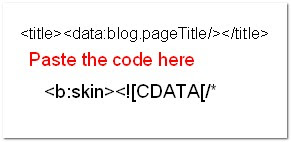 That's it! Now you can see a beautiful favicon in your blog.
Fee free to add the comments.....and doubts(if any?) That's it! Now you can see a beautiful favicon in your blog.
RocketMelt Browser-- Awesome!
Today i will share RocketMelt Browser Reviewwith you.

This is an awesome browser which is just perfect for any person who likes to stay connected while browsing the web. This browser provides chat box features in the bottom on the browser. Doesn't matter any page you visit, it will always be there for you :)

P.S - This was my personal experience, but you should also give it a try. Share your experience after using it.

This is an awesome browser which is just perfect for any person who likes to stay connected while browsing the web. This browser provides chat box features in the bottom on the browser. Doesn't matter any page you visit, it will always be there for you :)

P.S - This was my personal experience, but you should also give it a try. Share your experience after using it.
Bharti Airtel launches Airtel Photo Service for its broadband customers

Bharti Airtel has launched a digital photo printing service for Airtel Broadband customers, in association with leading photo-service, Zoomin.com. Called Airtel Photo Service, users will be able upload their photos online, and have them printed, and then delivered to their doorstep.
Apart from printing photographs in matte, gloss and luminous print finishes, Airtel Photo Service gives users many other media to choose from, from T-shirts to mugs, calendars to photo-albums, which can all be customized with personal messages, themes, art clips, etc. Along with online editing tools, users have a handy Organizer to create customized collections.
Users will also be able to store an unlimited number of photos online in their Airtel Photo Service account, and can import albums from Facebook.
The service is available only for Airtel Broadband users, and to make things simple for them, does not require payment online via credit/debit cards. Instead, each item purchased will be billed to the monthly Airtel Broadband postpaid bill, using a ‘pay per instance’ feature to keep track of items. Photo products available on Airtel Photo Service range from Rs. 65 to Rs. 595, inclusive of applicable taxes and delivery charges.
Opera 11.10 released; Improves Opera Turbo and the Speed Dial
The latest release of Opera is out, and it brings some great improvements to two of the browsers beloved features, Opera Turbo, and the Speed Dial.
The updated Opera Turbo now promises of offer greater compression than ever while simultaneously improving on quality. Opera Turbo now uses Google's new open WebP image format rather than JPEG making such improvements possible.
Of course since Opera is using WebP in turbo, they have also added support for the format in the browser. While the format is far from popular — in fact it is currently not supported in any major image editor or viewer — supporting this new open format means that there is hope that the format will take off with time. You can check out a gallery of WebP images here.
The other big change is in how Opera's Speed Dial works. In recent versions Opera added support for more speed dial layouts. This feature has not received the ultimate upgrade. It now supports unlimited entries, and the layout fluidly accommodates any new entries you add rather than displaying an inflexible grid with some missing entries. Additionally, you can zoom into or out of the Speed Dial and the entries will fluidly take the optimum layout.

Another update to Speed Dial is the thumbnails displayed. While thumbnails are useful, most sites when displayed in their entirety in a small thumbnail window become indiscernible. Opera now lets website authors specify what should be shown in this thumbnail. This thumbnail need not be static either, it can provide dynamic content, even animated content that can pull information from your account, making it more personal.
Opera 11.10 also comes with improved support for web standards, with CSS3 multi-column layouts, WOFF fonts support, CSS3 gradients and more.
Plug-in detection and installation has now also been automated, so if you visit a website that requires the Flash Player and you don't have it installed, Opera will download and install it automatically.
What lies ahead is Opera 11.50, preview builds of which are already available. This version is expected to finally bring hardware acceleration to the Opera browser, and will feature an HTML5 parser, which is one of the most important parts of the new web standard.
You can download Opera 11.10 for the platform of your choice from here
The updated Opera Turbo now promises of offer greater compression than ever while simultaneously improving on quality. Opera Turbo now uses Google's new open WebP image format rather than JPEG making such improvements possible.
Of course since Opera is using WebP in turbo, they have also added support for the format in the browser. While the format is far from popular — in fact it is currently not supported in any major image editor or viewer — supporting this new open format means that there is hope that the format will take off with time. You can check out a gallery of WebP images here.
The other big change is in how Opera's Speed Dial works. In recent versions Opera added support for more speed dial layouts. This feature has not received the ultimate upgrade. It now supports unlimited entries, and the layout fluidly accommodates any new entries you add rather than displaying an inflexible grid with some missing entries. Additionally, you can zoom into or out of the Speed Dial and the entries will fluidly take the optimum layout.

Another update to Speed Dial is the thumbnails displayed. While thumbnails are useful, most sites when displayed in their entirety in a small thumbnail window become indiscernible. Opera now lets website authors specify what should be shown in this thumbnail. This thumbnail need not be static either, it can provide dynamic content, even animated content that can pull information from your account, making it more personal.
Opera 11.10 also comes with improved support for web standards, with CSS3 multi-column layouts, WOFF fonts support, CSS3 gradients and more.
Plug-in detection and installation has now also been automated, so if you visit a website that requires the Flash Player and you don't have it installed, Opera will download and install it automatically.
What lies ahead is Opera 11.50, preview builds of which are already available. This version is expected to finally bring hardware acceleration to the Opera browser, and will feature an HTML5 parser, which is one of the most important parts of the new web standard.
You can download Opera 11.10 for the platform of your choice from here
YouTube rolls out live streaming site

YouTube started the initial rollout of its live streaming service Friday, which will add live video capabilities to the Google-owned site for the first time.
YouTube Live is, well, live at youtube.com/live. Tune into live shows or add upcoming episodes to your Google calendar.
YouTube Live is currently advertising a show about the NBA Playoffs Preview, which will air tonight at 7pm Eastern. Google will also offer a live tour of its headquarters at 7pm Pacific. LA Film Critic Association members, meanwhile, will offer reviews of new movies at 8pm Pacific. There are also several other shows airing today and over the next week, with a live comments feature that lets users chime in.
YouTube said it will also gradually roll out its live streaming platform to certain YouTube partners with accounts in good standing. "The goal is to provide thousands of partners with the capability to live stream from their channels in the months ahead. In order to ensure a great live stream viewing experience, we'll roll this offering out incrementally over time," YouTube said in a blog post.
YouTube kicked off a test of live streaming in September. The two-day pilot included four partner Web sites: Howcast; Next New Networks; Rocketboom; and Young Hollywood.
Earlier this week, there were reports that Google will invest as much as $100 million into original content for YouTube and organize it into channels around arts and sports. YouTube is reportedly seeking a middle ground between the professional content that dominates sites like Netflix and the amateur video upon which YouTube was founded, according to the Wall Street Journal.
In August, Facebook launched its "Facebook Live" video streaming channel, though the site is intended to keep users updated on the goings on at Facebook and does not feature original content from users or partner sites.
Mozilla switches Firefox to 18-week development cycle; Firefox 5 expected June 21
 Didn't we just get Firefox 4 a little bit ago?
Mozilla is borrowing a page from Google Chrome and speeding up the development cycle for Firefox releases, setting new iterations of the browser for fixed time periods and bulldozing over features that just aren't ready to make it into a new browser release.
And if Mozilla sticks by its newly proposed plan, that means that we'll be seeing Firefox 5 on June 21—following a shortened 13-week development cycle instead of the proposed 18-week cycle for all future Firefox builds.
Within this 18-week cycle comes a new development stage that adds on to Mozilla's three previous update channels: Nightly, or builds created from the mozilla-central-repository that are highly unstable, but incorporate the latest texts and fixes; Beta, which ups the quality demands of features and tweaks added via the nightly builds; and Release, which becomes the version of Firefox that most consumers are used to using.
Mozilla's new stage, Aurora, will be a nightly update that splits the difference between the chaos of the company's Mozilla-central build (or Nightly build), and its Beta build.
That's a lot of gobbledygook for non-developer types, so here's a general walkthrough of how Mozilla development is going to be handled in the future. Developers will have a given window to write patches and improvements as part of Mozilla's initial nightly Firefox builds. As this build switches over to the new channel, Aurora, features will be analyzed and dropped off if they're deemed ineligible for the current release cycle—no new features will be added directly into the Aurora build.
However, Mozilla recognizes that some Firefox changes might take longer to develop than the six weeks they're sitting in the Nightly channel.
"Features that end up disabled or miss the scheduled transition to the experimental channel can be pulled again the next time the schedule permits," reads Mozilla's Developmental Process draft. "This policy does allow for features that take a long time to develop. It's just that they'll be present only on mozilla-central until they're ready."
Mozilla will pull code from its Nightly database at set intervals instead of a, "when it's ready" approach, which will allow developers to quickly analyze and eliminate problematic features at these critical junctures.
"Since Mozilla-central will be pulled into the Firefox-experimental channel at week 6 and week 12, such features will need to have a mechanism allowing them to be easily disabled. Essentially, it needs to be easy to get the code on Mozilla-central into a shippable state by disabling new code," reads Mozilla's draft.
Mozilla estimates that it'll be able to pull 100,000 users to test and tweak its nightly Firefox builds. This number increases to one million for the Aurora build and ten million for the Beta build, which would be a weekly update that's intended to fine-tune the browser for full release. Release managers make a determination on Week 14 as to whether a Firefox release is possible and, if so, the build is scheduled for a full launch to Firefox's complete user base on Week 16.
That said, mark your calendars for a Firefox 6 release around mid-August. And as for what you might see in Firefox 5, PCMag.com's Michael Muchmore has taken a look at some of the proposed features for browser's next iteration.
LinkedIn launches Android app

LinkedIn this week removed the beta tags from its Android app and made it available in the Google Apps Marketplace and the LinkedIn Web site.
"LinkedIn for Android, is a continuation of our efforts to help you leverage the power of your professional network anywhere, anytime," LinkedIn's Chad Whitney wrote in a blog post. "Now, you can walk into any interview, any customer engagement or client meeting with the ability to look up the details on over 100 million professionals worldwide, in real-time."
The app brings the functionality of the LinkedIn Web site to the smartphone. A home screen provides links to six modules: Updates, Connections, Invitations, Search, Reconnect, and Messages. It looks much like the Facebook app, except that you're scrolling through professional contacts rather than random photos from high school friends.

LinkedIn launched the beta version of its Android app in December, which at the time just included links to Updates, Connections, Invitations, and Search.
"Since the launch of our Beta, the team and I have had the great pleasure of working with a passionate group of Beta testers," Whitney wrote this week. "Their feedback, bug reports, and involvement in the process were invaluable, and we want to express our sincere thanks for all of the contributions."
Whitney promised to update the existing app in the coming months with "features that have been heavily requested during the public beta."
The announcement comes the same week that LinkedIn took a shot at Facebook with a new platform that will let third-party Web sites add content from the professional social-networking site.
Last month, LinkedIn also launched a number of new products, including the LinkedIn Today news site, LinkedIn Skills, LinkedIn Maps, and updated its LinkedIn iOS app with the new news focus. The company also said that its LinkedIn Signal product would be opened up to all users.
LinkedIn reached 100 million users last month, and has taken the first step in preparing for an initial public offering.
Google to streamline YouTube, offer original featured content

In no small part due to its industry difficulties with Google TV, Google is looking to kickstart a new era of viewership for its popular online video portal - YouTube, and is reportedly injecting $100 million towards this cause.
To compete on an adjacent playing field with the big boys of the television and feature film industry, Google is looking to offer streamlined content channels to users, based around popular topics and categories, each of which will feature professionally-produced YouTube-commission content apart from user-generated material.
Google Commerce Search 3.0 brings Instant Search and other new features
Google’s Commerce Search, the search giant’s online shopping product, has been upgraded to Commerce Search 3.0, bringing Instant and other improvements, all aimed to towards delivering a faster, more personalized shopping search experience for consumers, and a better platform for retailers.
Google Commerce Search will now incorporate Google Instant, providing search results in the search bar as you type. Local product availability is also a feature now, with Google pointing out stores near you that stock the product you are searching for. Also new, is product recommendations, a Google Labs feature that has yet to be graduated. It shows what other buyers of the product have to say about it.

Subscribe to:
Posts (Atom)